01 /
How I chose (and what I get out of this)
A “best” list is an opinion, so I'm putting the criteria in plain sight so you can disagree with arguments. I weighed, in this order:
- Security architecture: whether it has a certified secure chip (EAL5+ or EAL6+) and how much of its code anyone can review.
- Incident history: what has failed, how long they took to disclose it and what they did for the people affected.
- Buying from Spain: an official store that ships to the EU with prices in euros, versus prices in dollars with VAT and customs on top. This is what matters if you live in Spain or elsewhere in the EU.
- Real-world use: screen, Bluetooth, NFC or QR, battery and how hard it is to make a mistake.
- Coins: how many it supports and whether there's a Bitcoin-only edition.
- Backups and language: backup options and whether you get an app and support in your language.
About the money, clear from the start: the Ledger and Trezor links are affiliate links. If you buy through them I earn a commission and you pay the same as in their official store. None of the other brands pays me anything. Ledger is the hardware wallet I recommend in my videos and Trezor is the open-source alternative; even so, you'll see their drawbacks in the same detail as everyone else's.
02 /
My top cold wallets for 2026
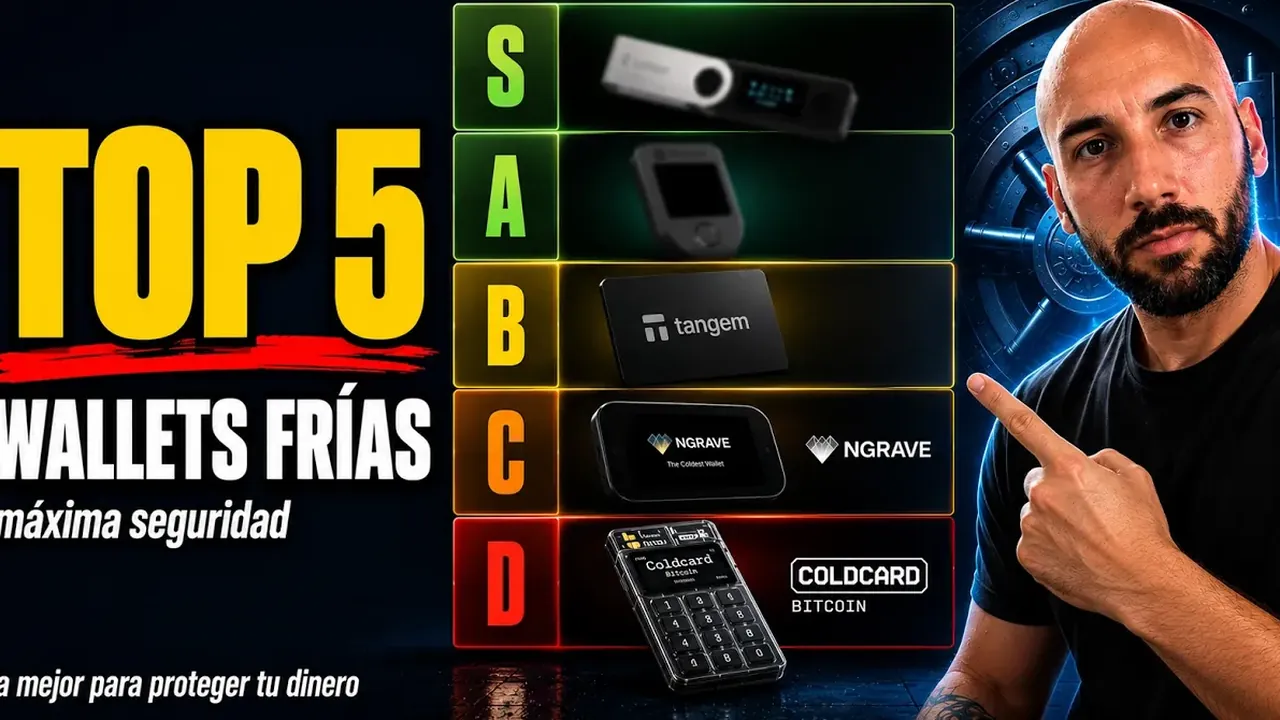
They're ordered from most to least recommendable for most people buying from Spain or elsewhere in the EU. It isn't a race: number three may be the best one for you if it fits what you do. All prices come from the official stores, checked on October 17, 2026.
1. Ledger: the most complete (Nano S Plus, Nano X, Nano Gen5, Flex and Stax)
It's the one I recommend in my videos for most people, for practical reasons: a secure chip with EAL6+ certification across almost the whole range (the Nano X has an EAL5+), more than 500 coins in its Ledger Wallet app and thousands more by connecting it to wallets like MetaMask, and Bluetooth on the models that have it so you can use it with your phone. The range starts at €59 with the Nano S Plus, which is USB only, and continues with the Nano X at €99, the Nano Gen5 at €179 (the first touchscreen Nano, with an E Ink display, Bluetooth and NFC), the Flex at €249 and the Stax at €399. Those are the prices in the official Ledger store, checked on October 17, 2026.
The drawback: the system that runs inside the secure chip is closed because of a non-disclosure agreement with the chip maker, so for that part you have to trust Ledger. It also carries the Ledger Recover controversy, two customer data leaks and, in October 2026, tampered units sold by a reseller in Southeast Asia. I tell you everything further down.
2. Trezor: the open-source one (Safe 3, Safe 5 and Safe 7)
Trezor publishes its firmware and the design of its devices, and in the Safe range it adds an EAL6+ secure chip chosen precisely because it doesn't force the company to sign non-disclosure agreements. The Safe 3 costs €59 (two buttons and a small screen), the Safe 5 goes for €129 (color touchscreen) and the Safe 7, at €249, comes with a 2.5-inch touchscreen, Bluetooth, a battery, wireless charging and a second, auditable secure chip, the TROPIC01. Prices from the official Trezor store as of October 17, 2026. All three have a Bitcoin-only edition and let you split the backup into several parts.
The drawback: its 2026 leaks (ShipMonk and Brevo) and the fact that the Safe 3 and the Safe 5 only connect through a USB-C cable. In 2025, Ledger's security team demonstrated a physical attack on the Safe 3's microcontroller that didn't manage to extract the PIN or the keys from the secure chip; Trezor considers it largely theoretical.
3. BitBox02 and BitBox02 Nova: the sober Swiss alternative
It's made by Shift Crypto, a Swiss company, with open-source firmware and a dual-chip design that includes a secure chip. In its official store, the BitBox02 costs €149 and the Nova €175; the Nova adds a glass screen, an EAL6+ secure chip and Bluetooth for iPhone and iPad. Both come in Multi and Bitcoin-only editions. Its most practical detail: the backup can be stored on a microSD card as well as on paper, and support is available in Spanish. In August 2026 it released firmware that fixes three flaws found in an internal audit, with no known exploitation.
The drawback: it supports far fewer coins than Ledger or Trezor (bitcoin, ether and ERC-20 tokens, Cardano or Litecoin), so if you hold altcoins on other networks it falls short.
4. Tangem: the card for people who hate cables
It's a card with an EAL6+ chip, developed with Samsung according to the manufacturer, that you use by tapping it against your phone over NFC: no screen, no battery and no cables. It's sold in packs of two cards for $54.90 or three for $69.90, taxes and duties not included. Each card works as a backup of the wallet, so if you lose one you can still get in with the others. Its website is available in English and Spanish, and it claims support for more than 14,100 tokens on more than 90 networks.
The drawback: since it has no screen, you can't check the address or the amount you're signing on the device itself; you depend on what your phone shows you. The card's firmware is proprietary, though audited by outside firms such as Kudelski, and in December 2024 it fixed a bug in its app that, for fewer than 0.1% of users, stored private keys in the logs that can be sent to support. The company says no funds were lost.
5. Coldcard: bitcoin only and for advanced users (with an asterisk)
Coldcard, made by Canada's Coinkite, is the benchmark for people who want bitcoin and nothing else: public firmware with reproducible builds, two secure chips from different manufacturers and fully offline use with microSD or NFC. The Q model adds a large screen, a full keyboard and a camera for QR codes. The Mk5 costs $219 and the Q $319, in its own store and in dollars.
The drawback, and it's a big one: the entropy flaw. Since March 2021, certain firmware versions generated seeds with far less randomness than they should have, and since July 30, 2026 about 1,816 BTC have been drained, roughly $116 million according to TRM Labs. New units now ship with the fixed firmware and, since August, Coinkite requires you to add your own entropy when you create the seed. But if you generated yours with an affected version, updating isn't enough: you need a new seed and your funds moved out. There's no record of it announcing compensation. With this data, I only see it for people who know how to generate the seed with dice and verify everything.
Chapters (6)
6. Keystone 3 Pro: offline, through QR codes
It signs without cables or Bluetooth: it talks to your phone through QR codes or a microSD card, has a 4-inch touchscreen, a fingerprint reader and, according to the manufacturer, three secure chips and fully open-source code. It costs $149 with free shipping, offers Bitcoin-only firmware and works as a signer for MetaMask, among other wallets.
The drawback: dollar pricing, and a website only in English and Chinese. In 2026, a joint audit with OneKey found a flaw in the USB software of its microcontroller that, with the device in hand, the PIN and an authorized connection, allowed code execution. Keystone fixed it with firmware 2.4.0 on April 1, and there's no record of it being exploited.
7. SafePal S1: the cheapest, with caveats
The S1 costs $49.99, VAT and duties not included, and signs offline through QR codes, with an EAL6+ chip according to the manufacturer and support for more than 200 networks. The X1, at $69.99, uses Bluetooth. To get started on a very small budget with lots of networks, it does the job.
The drawback: transparency. In 2020, Kraken Security Labs pointed out flaws, including weak tamper detection and unpublished code, which SafePal disputed; it has published part of the X1's code, but there's no record of the S1 firmware being open. And in August 2026, a bug in its website's order tracking exposed the name, email, address and phone number of 39,798 customers.
03 /
Quick comparison: price, chip, code and connection
A warning about the dollar prices: Tangem, Coldcard, Keystone and SafePal sell in USD, so if you live in Spain or elsewhere in the EU you may end up paying VAT or customs when the package arrives, depending on how it ships. Ledger, Trezor and BitBox show prices in euros in their official stores.
04 /
Which one to buy for your profile
- You're starting out and have little to store: Ledger Nano S Plus or Trezor Safe 3, both at €59. They do the essentials well; what you save on the screen you pay for in convenience.
- You want to use it with your phone without cables: Ledger Nano X, Nano Gen5 or Flex, Trezor Safe 7 or, if you live on your iPhone, BitBox02 Nova. Tangem if you want the simplest option and can accept having no screen.
- Bitcoin only: the Bitcoin-only edition of Trezor or of BitBox02. Coldcard only if you've mastered generating the seed with dice and offline use.
- You want to be able to review the code: Trezor or BitBox, which are open source; Keystone says it is.
- You hold altcoins on many networks, DeFi or NFTs: Ledger, for compatibility. The big screens on the Flex or the Stax help you read what you sign.
- You never want the device to touch a cable: Keystone 3 Pro, SafePal S1 or Coldcard Q, which sign through QR codes.
- Minimum budget and many networks: SafePal S1, knowing its transparency issues.
If you're torn between the two big names, the full comparison is in Ledger vs Trezor, with the models head to head at the same price. And if you're still not sure whether you need a cold wallet or a hot one is enough, start with hot vs cold wallet.
Chapters (7)
05 /
The controversies you should know about before you buy
I promised you above. No brand has a clean record, and I'd rather you hear it from me than from a nasty surprise.
Ledger Recover
In May 2023, Ledger announced an optional paid service that encrypts your seed, splits it into three fragments and spreads them among Ledger, Coincover and EscrowTech, with identity verification to recover it. It drew a storm of criticism: if the firmware can take a copy of the seed out of the chip, even encrypted and only with your permission, the promise that the seed never leaves the device stops being absolute. Ledger defended it, delayed the launch until October 2023 and is still selling it in 2026. If you don't sign up for it, it isn't activated. Don't confuse it with the Recovery Key, an NFC card with a secure chip that serves as a physical backup and comes with the Flex, the Stax and the Nano Gen5.
Data leaks
Ledger: in 2020, someone accessed its e-commerce database with about a million email addresses and, in December of that year, 272,853 customers were published with their name, address and phone number; in January 2026 came another breach through Global-e, which handles its store's orders. Trezor: 66,000 support contacts in January 2024; 80,689 customers exposed by its shipping company ShipMonk in August 2026, although Spain isn't among the countries of the affected orders; and about 347,000 email addresses that received phishing after the Brevo breach in September 2026. SafePal: 39,798 customers in August 2026. None of them exposed seeds, but they all fuel phishing by email, by phone and even by letter. If you receive something like that, read my guide to crypto scams first.
Implants in Ledger devices from a reseller (October 2026)
Since October 9, Ledger has been investigating thefts from buyers of CryptoBilis, an authorized reseller in Southeast Asia. Inside some devices there was a circuit with an LTE modem and an eSIM that captures the 24 words during setup and sends them out. Because it doesn't touch the secure chip, Ledger's Genuine Check doesn't detect it. Ledger has asked resellers in seven Asian markets to stop sales and recommends that those affected create a new seed on a new device. In Europe, MediaMarktSaturn pulled Ledger devices as a precaution after a customer complaint in Germany.
06 /
How to buy one without ending up with a tampered device
The first attack on a cold wallet can happen before you take it out of the box. I repeat it in the descriptions of my videos, and after October 2026 I'd repeat it twice as often:
IMPORTANT: buy your cold wallet ONLY from the manufacturer's official website (Ledger, Trezor, Tangem...). Never second-hand or from third parties.
- The official store and nothing else. No marketplaces, no second-hand units, no bargains: in the implant case, tampered units turned up that had been bought on Amazon Japan, from a third-party seller, and at online auctions, and some people saw them listed at almost half price.
- Never a pre-written seed. If the box contains a card with words on it or the device is already set up, send it back. The seed is generated by the device, in front of you.
- Check the box and the seal and compare them with the manufacturer's photos. Trezor, for example, ships its devices without firmware installed: you install it yourself during setup.
- Don't rely on the authenticity test alone. Ledger's Genuine Check verifies the chip, not whether someone has put extra parts inside.
- Download the app from the official website, typing the address yourself. In April 2026, a fake Ledger Live for Mac made it into the App Store and stole about $9.5 million.
If you go with one of the two I recommend, these are their official stores:
07 /
Set it up properly from the very first minute
- 01
Install the official app
Ledger Wallet, Trezor Suite, BitBoxApp or your brand's app, always from its official website. No links from ads or messages.
- 02
Install or update the firmware
The app does it and the device checks that it's genuine. If it asks for something strange, like typing words into your computer, stop.
- 03
Choose a real PIN
Not your date of birth, not 1234. After several failed attempts the device wipes itself, and that's a good thing.
- 04
Generate the seed and write it down by hand
In private, with no cameras around, in the exact order and never in a photo. With Trezor you can choose the standard 20-word backup, the 12 or 24 words of the BIP-39 standard, or a backup split into several parts.
- 05
Verify the backup
The device will ask you to confirm words. Take your time: a mistake here is money lost tomorrow. If your app offers a backup check, use it.
- 06
Receive a small amount first
Generate an address, compare it character by character on the device's screen and send a test from the exchange before anything else.
- 07
Move the rest and keep the backup far away
When everything checks out, move the rest. Keep the seed separate from the device and, if the amount justifies it, on a metal plate.
For your first purchase and the transfer from the exchange to the wallet, the step-by-step is in how to buy bitcoin, and the rest of the rules on the seed, scams and inheritance are in the security section.
08 /
My verdict for 2026
If you want a single answer: for most people, a Ledger or a Trezor bought from its official store. Ledger if you value compatibility, Bluetooth and big screens; Trezor if you want to be able to review the code or want a Bitcoin-only edition. BitBox02 is the most serious third option, Tangem the simplest, and Coldcard, Keystone and SafePal have their audience, with the drawbacks I've described.
Even so, the brand matters less than three habits: buying from the official store, generating the seed yourself and never typing it on any screen other than the device's. No hardware wallet protects you from signing a trick transaction or from a badly stored seed. And for the money you move every day, the natural partner of your cold wallet is a hot one: you'll find them compared in the best hot wallets of 2026.
Chapters (7)
This is NOT financial advice. It's my personal analysis. Always do your own research.
Keep learning